Posts tagged with #technology

Links

From yesterday’s paper: validation for my own feelings on this matter.

Q. What makes you think that people have become addicted to digital devices and social media?

A. In the past, we thought of addiction as mostly related to chemical substances: heroin, cocaine, nicotine. Today, we have this phenomenon of behavioral addictions where, one tech industry leader told me, people are spending nearly three hours a day tethered to their cellphones. Where teenage boys sometimes spend weeks alone in their rooms playing video games. Where Snapchat will boast that its youthful users open their app more than 18 times a day.

How do you define “addiction?”

The definition I go with is that it has to be something you enjoy doing in the short term, that undermines your well-being in the long term — but that you do compulsively anyway.

But those two months I did nothing but play Crossy Road—that was just time well spent.

We’re biologically prone to getting hooked on these sorts of experiences. If you put someone in front of a slot machine, their brain will look qualitatively the same as when they take heroin. If you’re someone who compulsively plays video games — not everyone, but people who are addicted to a particular game — the minute you load up your computer, your brain will look like that of a substance abuser.

Links

The Eighties documentary (available on Netflix) is fantastic. I binge-watched the eight episodes in an evening and a morning, and this one on the tech boom was particularly interesting (for me). The conclusion to the episode kinda blew me away, so I recorded this video and texted my friends about it.

Dev Stuff

The login experience for American Express is nuts.

First, they don’t allow passwords longer than 8 characters. A financial site limiting password length? Smart. Not to worry, there’s sound reasoning for that:

The length of the password is limited to 8 characters to reduce keyboard contact. Some softwares can decipher a password based on the information of “most common keys pressed”.

Therefore, lesser keys punched in a given frame of time lessen the possibility of the password being cracked.

Phew! I was worried for a minute, there. Sounds like they’ve got some smart folks coding this stuff up.

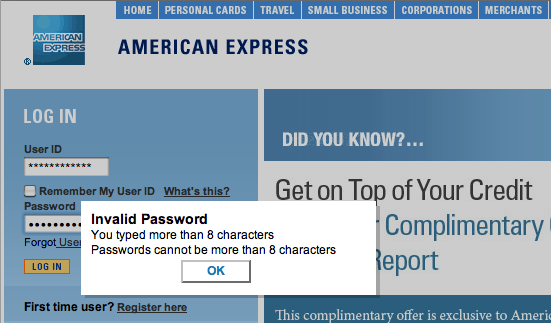
The worst part, though, is how they enforce that unnecessary length-limit. While they could have set the maxlength property on the password field to 8 characters and called it a day, they instead left it set at an appropriate 32 characters and implemented the following obnoxious javascript check:

  1. On key press, check password length

    amex_login.png
  2. If password length > 8, show a panel scolding the user for typing more than 8 characters.

    amex_invalid.png
  3. Clear password box.

    amex_login.png

Seriously, Amex?

Dev Stuff

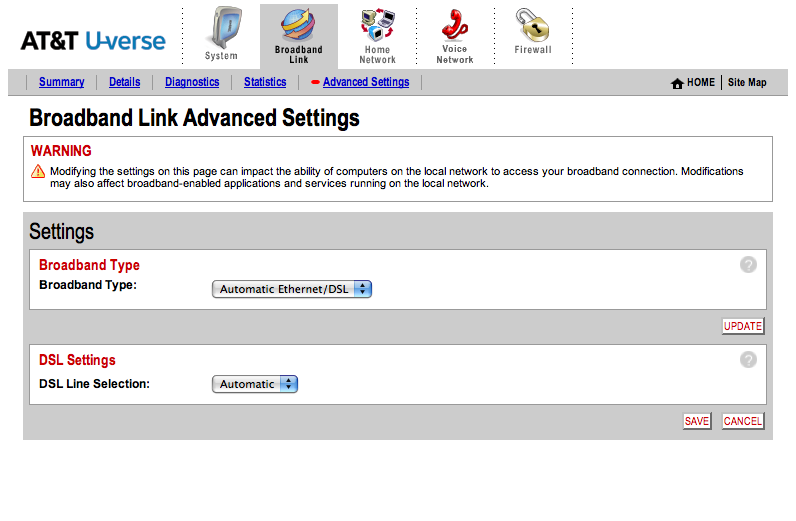
Here’s a screenshot of my 2Wire 3800HGV-B interface. See anything fishy?

uverse_before.png

Looks normal and ok, right? Auto detect those settings. Why not?

Yesterday, I was shocked to find out that if you actually specify your broadband type and line settings—mine were DSL and RJ-11, respectively—the difference you will notice in your U-verse DSL speed will make your jaw drop. I discovered this little tidbit while on the line to AT&T’s surprisingly awesome technical support, and it makes me wonder how many people out there are silently dissatisfied with their AT&T U-verse performance, when a solution is so close to home. Honestly, with this much of a performance boost, why didn’t the AT&T installer set up the router this way to begin with?

I had no idea that having the hardware auto-detect the line connections would impact performance so negatively. Consider me informed.

Dev Stuff

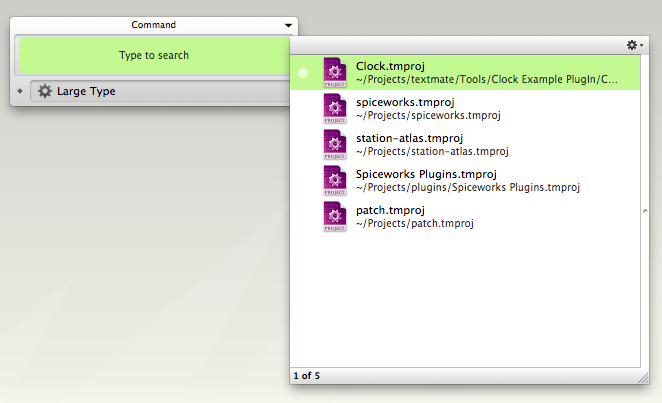
One of my favorite QuickSilver triggers is my TextMate Project launcher. I spend most of the day in one of several TextMate projects, so the first thing I do when I get to my computer is launch one of them.

⇧⎇ + T gets me this:

textmate_quick_launch.png

I select the project I want to launch, and I’m on my way.

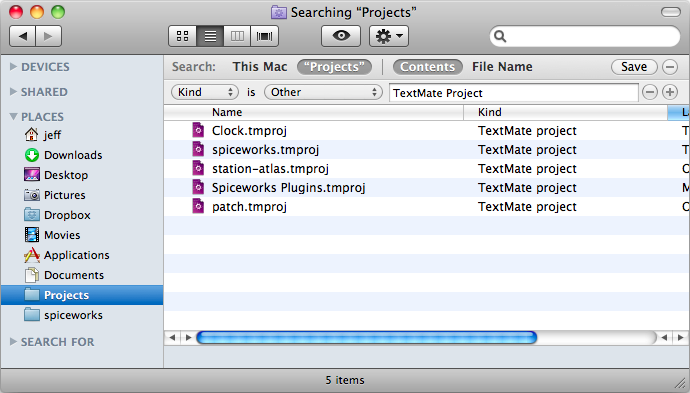
First create a saved spotlight search. Open up a finder window, and type a search into the search box to get additional search criteria, and save the search after you’ve filled in the criteria you want. My search looked like this:

spotlight_saved_search.png

You might have to restart QuickSilver in order to get that saved search to show up, but after you do you should be able to type in the name of that saved search in QuickSilver to retrieve it. Now you just need to create a trigger to pull that up, and you’ll be all set.

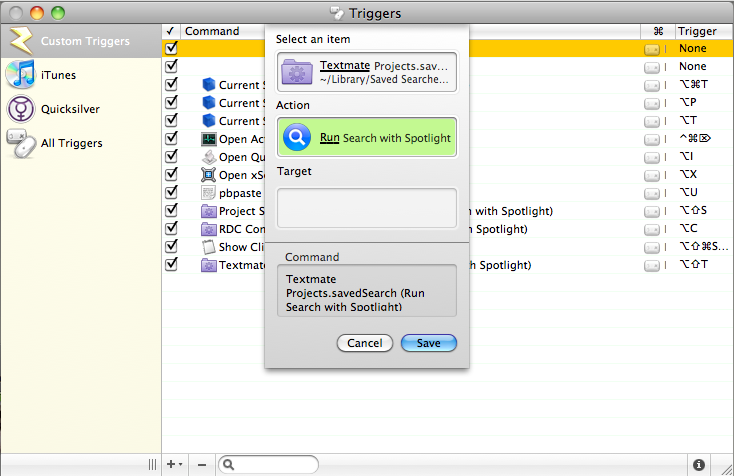
Select Triggers under the QuickSilver menu, and add a new HotKey command. Mine looks like this:

quicksilver_trigger.png

Save it, assign the shortcut you want to it, and you’ll be launching documents in fewer clicks than before.

Dev Stuff

Alignment on the PC: The checkbox lines up with the star, the star lines up with my one-click icon, the icon lines up with the sender name, subject, and message preview. Nice; things line up pixel for pixel.

Gmail + Firefox on PC

Alignment on the Mac: WTF? The checkbox and star line up, but past that, things are off kilter.

Gmail + Firefox on Mac

This is annoying, to me.

Dev Stuff

The problem for me with setting up GMail via Blackberry Internet Services the straight forward way was that my blackberry was getting everything my GMail account was getting, not just the stuff that shows in the inbox. That meant that all the mailing lists and other crap I’d rather not be annoyed with, which I’ve effectively removed from bothering me constantly by creating auto-archive filters + labels, was annoying me more than ever. Sure, BIS had filtering options, but rather than keep my filters in two places, I figured out a way to have the best of both worlds.

My requirements:

  • Only emails that I deem worthy to arrive in my inbox buzz my blackberry.
  • I have access to the other emails, if need-be.
  • When I send or reply to a message, it shows in GMail, keeping conversations intact, and providing an archive for all sent mail.

Achieving #2 is easy — you get the GMail application. While I’d prefer not to use it alone, it serves this purpose quite well. I can search all of my messages, and dig around my auto-filtered mail, if I should choose.

#1 and #3 seem straight forward, but require a few key tricks.

First, set up a blackberry email address. You know, something like yourname@mycingular.blackberry.net. In it, put your reply-to address as something you’d like to actually be contacted at. Either your plain ol’ gmail account, or an alias that forwards to it. For me, I chose the latter. Now set Auto BCC to your gmail account. This is key for keeping your conversations in tact. So it should look like:

Email Account: Blackberry
Your Name: Joe Mama
Email: joemama@mycingular.blackberry.net
Reply To: joe@joemama.com
AutoBC.C: joemama@gmail.com

Now we need GMail to forward you all mail that gets to your inbox, unless it’s from you. You can do this by creating a filter, like so:

“Matches: in:inbox -{from:joe@joemama.com}”
Do this: Forward to joemama@mycingular.blackberry.net

Now we need to make sure any email that is from you gets archived and doesn’t arrive in your inbox. We can make this happen by creating one more filter, like so:

Matches: from:(joe@joemama.com) in:inbox
Do this: Skip Inbox

And that’s it! This setup works perfectly for me. It took lots of experimenting to finally figure out a really good solution, but this seems to be it. I hope the next version of BIS allows you to choose one email account to send all email through, which would eliminate the need for the AutoBCC trick.