Posts tagged with #software

Dev Stuff

The login experience for American Express is nuts.

First, they don’t allow passwords longer than 8 characters. A financial site limiting password length? Smart. Not to worry, there’s sound reasoning for that:

The length of the password is limited to 8 characters to reduce keyboard contact. Some softwares can decipher a password based on the information of “most common keys pressed”.

Therefore, lesser keys punched in a given frame of time lessen the possibility of the password being cracked.

Phew! I was worried for a minute, there. Sounds like they’ve got some smart folks coding this stuff up.

The worst part, though, is how they enforce that unnecessary length-limit. While they could have set the maxlength property on the password field to 8 characters and called it a day, they instead left it set at an appropriate 32 characters and implemented the following obnoxious javascript check:

  1. On key press, check password length

    amex_login.png
  2. If password length > 8, show a panel scolding the user for typing more than 8 characters.
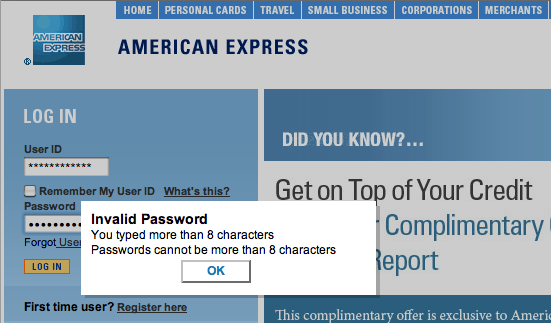
    amex_invalid.png
  3. Clear password box.

    amex_login.png

Seriously, Amex?

Dev Stuff

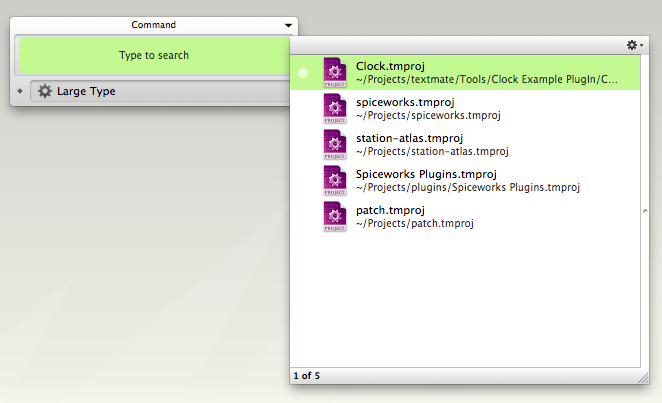
One of my favorite QuickSilver triggers is my TextMate Project launcher. I spend most of the day in one of several TextMate projects, so the first thing I do when I get to my computer is launch one of them.

⇧⎇ + T gets me this:

textmate_quick_launch.png

I select the project I want to launch, and I’m on my way.

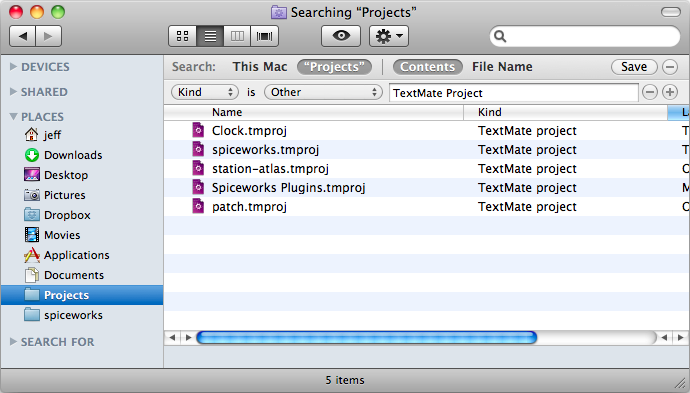
First create a saved spotlight search. Open up a finder window, and type a search into the search box to get additional search criteria, and save the search after you’ve filled in the criteria you want. My search looked like this:

spotlight_saved_search.png

You might have to restart QuickSilver in order to get that saved search to show up, but after you do you should be able to type in the name of that saved search in QuickSilver to retrieve it. Now you just need to create a trigger to pull that up, and you’ll be all set.

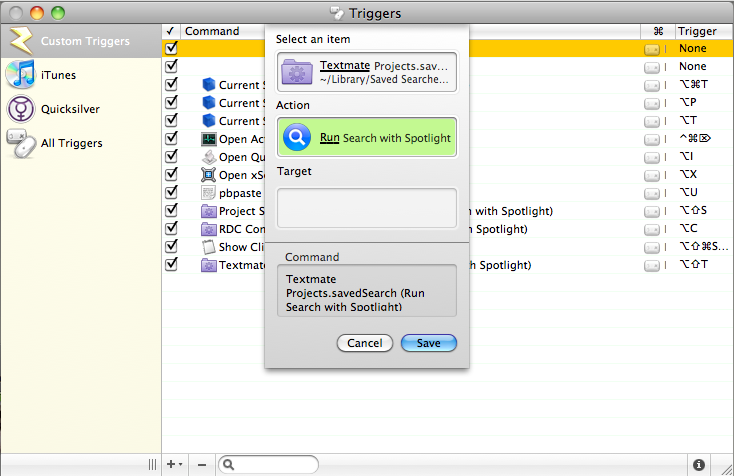
Select Triggers under the QuickSilver menu, and add a new HotKey command. Mine looks like this:

quicksilver_trigger.png

Save it, assign the shortcut you want to it, and you’ll be launching documents in fewer clicks than before.

Dev Stuff

Alignment on the PC: The checkbox lines up with the star, the star lines up with my one-click icon, the icon lines up with the sender name, subject, and message preview. Nice; things line up pixel for pixel.

Gmail + Firefox on PC

Alignment on the Mac: WTF? The checkbox and star line up, but past that, things are off kilter.

Gmail + Firefox on Mac

This is annoying, to me.

Dev Stuff

Sorry for the delay, but the update is finally out. Well, it was actually out last month, but due to moving across the country, I didn’t quite follow through on the release process.

The new version is completely rewritten using Google’s new Gmail API, but still contains the old [very ugly, in retrospect] code to support any users who haven’t been so fortunate to get the new version rolled out to them (many Google Apps For My Domain users, namely).

The features are about the same, with one addition. Option/Alt-clicking the one-click icon performs a domain search.

Even with Gmail’s unlimited storage, I have emails I never want to revisit again (like myspace’s some-shitty-band-wants-to-be-your-friend requests). These usually pile up for a while, and then one day when I feel ambitious I go through and clear them out. This new feature makes this process dead easy; option/alt click the icon next to a guilty message, and delete all the returned results.

One Click Conversations is available for Gmail on Firefox through the use of Greasemonkey. This script should be included in the Better Gmail 2 plugin sometime soon.